ActiveCampaign Review | Extraordinary Email Marketing Tool for B2B and B2C Marketers | Start Free Trial


Summary

ActiveCampaign is one of the best campaign management software that is simple, reliable, and can perform all the functionalities of any email marketing software. The most important feature of any email marketing software is its automation and autoresponders based on certain conditions that assist automate lists and manage contacts.


The conversation is another feature that helps send targeted messages straight to your website visitors and optimize the overall customer experience and create sales funnels for more conversions.


With the entire activity and information in a single place, you can find a complete view of sales and marketing performance.


Ease of Use: Important Features of ActiveCampaign

ActiveCampaign is a free marketing automation software that offers a free trial, and you can sign up from the website. You need to give some basic details like your email address, phone number, etc. Once you complete filling in the details, you can log in with the registered email address and password.


Once you log in with the details, you will see the dashboard, i.e Overview of its functionalities and features. At the core of ActiveCampaign is its comprehensive email marketing functions. Its attributes branch out to create a more in-depth experience for yourself and also your customers.


ActiveCampaign helps us understanding the outcome you can have from your business and ensures seamless interaction and engagement with your audience. Let’s break down its components to understand its working along with its vital elements.


Contact Management


Collecting detailed information about your customers means understanding audience behavior, their likes, dislikes, etc. With this tool, you can add several custom fields like landing pages and signup forms that collect data the way your business needs. You can also choose every new field like text, dropdown, etc. improves the user experience.


ActiveCampaign is suitable for both B2B and B2C marketers; you can also add extra information on the size and turnover of your business at multiple contact points.


Campaigns


It is now easy to create a campaign on the type you wish to choose and send it to subscribers. There are various campaigns to choose from, 


  • Standard – This type helps to send a one-time email to segments or subscribers.
  • Automated – Creates actions that can be used as conditions or triggers for your campaigns.
  • Autoresponders – Creates emails that can be received instantly by subscribers
  • Split test – Able to launch multiple variants of the same email
  • Datewise – Send mails on a particular milestone
  • RSS Triggered -Emails are sent when there is new content published on the RSS feed.

Once you choose a campaign and select a list, you can then design using any of the available templates. 


Email Marketing

The vital function of email marketing is to collect major prospects and send the best ones at the right time. ActiveCampaign offers some crucial variables that you can manage and control to reap better results. 

Segmentation list

This is the ability of the tool to segment your audience into different groups to send more target emails for more conversions. This can be done by tagging subscribers depending on how they joined the list.

Collect emails

Once you create listed segments, you can build the next one. ActiveCampaign allows creating of forms in four layouts,


  • Inline form
  • Floating bar
  • Floating Box
  • Modal

Form building is pretty easy using any layout, appearance, or theme that fits your needs. You can also drag and drop the elements on the form to add more details. In addition to this, you can also create landing pages.

ActiveCampaign Pricing

There are four plans in ActiveCampaign pricing plan from which you can choose one. Amazingly, there is a 14-day free trial option that helps to test the features and make an informed decision to choose the next paid plan. 


Every plan includes certain features that are limited to itself. And also, the pricing depends on the number of subscribers you have. More subscribers indicate higher is plan pricing irrespective of the plan of your choice.


The plans are divided according to the business type,

  • B2B
  • B2C
  • Ecommerce

Let’s look at the various plans and a few features of each plan,


1) Lite


Suited for- For startups and small business

The plan starts at $9/month if billed annually for 500 contacts

Integrates with more than 300 apps and tools

Segments lists and creates marketing automation systems that you can track and monitor

Creates new subscription forms that can collect leads to which you can send unlimited newsletters and emails.


2)Plus


Suited for – Digital marketers who want to scale their business

The plan starts at $49/month when billed annually for 500 contacts

Includes all features under Lite Plan plus up to 25 users for email, support, and chat 

Builds customized branded landing pages and forms to collect more and more leads

Keeps track of the leads, and contacts with the help of its CRM tool

Supports SMS marketing along with your email support


3)Professional


Suited for – Business with best lead generation and email marketing features

The plan starts at $129/month if annually billed.

Includes all features in Plus Plan and an additional 50 users for email, chat, and customer support

Uses split automation feature to provide customers and lead with some personal experience.

Live chat widget sends messages from your site using the software

The tool’s AI is used to create content, sending emails, and calculating win probability to boost conversions


4)Enterprise


Suits Enterprises and agencies looking out for the most power-packed features of ActiveCampaign.

The plan starts at $229/month when annually billed

Includes all features under Professional Plan and unlimited users for email, chat, and customer support

Can receive free designs for newsletters, landing pages, and emails

The mail server domain and custom reporting are an added advantage

On-time help from dedicated account personnel who guides you can get all through the process.


Advantages of using ActiveCampaign

Options

ActiveCampaign isn’t limited to email marketing platforms, but it is a holistic marketing automation software with varied options and tools to assist in all digital marketing initiatives. 


Powerful Automation

ActiveCampaign is considered a top-notch marketing automation tool that is not only easy to use but also powerful.


Vast Deliverability

This tool is one of the best tools in email delivery that passes the deliverability test.


Systematic Reporting

The Reporting is done in many fields like page visits, geo-tracking, and click-maps. Purchase tracking is another element available on bigger plans of WooCommerce, Bigcommerce, and Shopify.


Free Migration

If you are using a different email marketing software and wish to migrate to ActiveCampaign, then that can be done free of cost in this tool. 


Support

The tool offers 24/7 live chat support irrespective of any plan. Messaging system is instant and helpful.


Simplicity

The entire platform of ActiveCampaign is very intuitive and simple that even beginners love its simplicity. There is no need for any pre-requisite technical knowledge.


Disadvantages Of using ActiveCampaign

No free plan

Alas, there is no free plan available but only a free trial. There are other simple tools available if you are looking at cheaper options. 


Overpowering features

The available features might be overwhelming if you are looking at simple options. There is much other software that is more simple and easy to use.


More to Read,

AWeber Review- Is it a Worthy Email Marketing Solution?

Sendinblue Review | Incredible Email Marketing Service | Start for Free

SendPulse Review – A complete email marketing software  


Activecampaign review – Verdict 

We have now completed surfacing the details of ActiveCampaign and its various functionalities and usability. The Chrome Extension manages your campaigns and leads directly from your Gmail account. You can then assign tasks to your team from your account. 


The ActiveCampaign software is one of the customer experience automation platform with the remarkable automation feature that takes the software to the next level. There can be many actions that are executed on your site through live chats and emails. This action keeps the visitors engaged and pushes more conversions. 


Probably, at this point, you will have a better insight into the overall value of ActiveCampaign. Learn more about the software or try it free to decide whether this is the one that is best for you. 


Originally Posted On: SaasTrac

ABOUT THE AUTHOR


SaasTrac is one of the trusted places where users can find reviews on different Saas Products, Softwares, and Platforms. Our major goal is to let users know the detailed and the most helpful information possible about every product—the good, the bad, and the ugly in the SaaS space.


Sellfy Review – Customizable Online Storefront | Start 14-day Trial | Find Amazing Offers This BLACK FRIDAY


There are several free ways to find marketing ways but is it as easy as said? The various factors that come into the picture like building a digital site, searching for a network of people to purchase from you, and introducing guest posts or reviews to expand your reach. This takes a whole lot of time and money and at one point in time, you feel distressed at the simple thought of getting into the business. 


What if you find a simple tool that can help to turn your social media channel or website into an online store simultaneously sharing your digital products with a huge network who are already searching for products similar to your market. 


Overview

Sellfy is one such platform where you can build your storefront, broadcast your products to numerous in your network and also have a chance to post and sell your products. This platform makes your e-commerce process slightly easier with some relaxation to your time and money.


Main Features

Ease of Use 

Appreciatively, there is no initial payment, nor any card information required to explore things on Sellfy. The 14 days free trial period helps you understand the platform better. It is very easy to Sign up with basic information and once done, you will be directed to the on-boarding channel that is accessible in the form of a 7-part checklist. 


The aim is to explain the steps of creating and customizing the online store along with managing and selling your digital products. On the whole, the entire setup process takes a few minutes and the simple steps make it easier for even beginners to follow them.


Once you start, managing the store is also hassle-free. The dashboard is a mix of simplicity and easy functionality. The intuitive, well-organized, and simple system is equally refreshing and interesting to use. 


The Home Menu is the main screen where you can access all important tracking functions. You can view Subscriptions, Orders, Analytics, and Customers for quick insights.


Next, you have the Products field where you can easily manage your items. You can share the products easily on your social media just with a click of a button. You can embed your Buy button on third-party websites including YouTube and Facebook. This way, you can convert your social media followers to your customers. 


Customizing your Online Store

Sellfy’s default storefront is simple, clean, and organized. You can get started with the customization process and edit your content as well as the layout. The layout’s color schemes can be adjusted along with altering buttons, header, page style, logo, etc. 


There is no scope for advanced customization as the platform is in itself very simple and bland. The max that can be done is to add social media profiles and edit store pages. The storefront comprises the standard web pages seen on any basic online store which includes About, Contact and Terms. Customizing them is very easy and can be done with a single click and pages can be changed or eliminated. 


The Store Settings lets you tweak general settings, payment settings, embed options, product categories, email templates, taxes, and invoice settings. You can enhance your online sales with a wide range of decent integrations. 


Your sales traffic can be monitored with Google Analytics. Twitter Ads Conversation Tracking analyzes business via Twitter. Facebook Ads and Facebook Live can be integrated for customer engagement. The most important integration is that with Zapier since it provides access to numerous app integrations. 


Product Management

Sellfy’s product management is straightforward and the functionalities are self-explanatory that makes uploading your digital items hassle-free. It lets you specify the product price and description along with the item name. In addition to it, you can even add images to make your product page more intuitive. If you wish, you can also add the product keywords in the product description section that can optimize your sales page in the search engine. 


There is no limitation on the number of items you want to sell. The entry-level plan also lets you upload several products. The major point to be noted here is that products should be arranged and placed in their specific categories. The platform has a handy product category of Sellfy lets you organize your digital products like photos, videos, books, subscriptions, etc.


The platform’s ‘Pay What You Want’ improves the conversion rates and lets customers figure out their buying amount as per their affordability. This feature is also important for a subscription-based business as you can retain your customers for a long time giving them the choice to select a fairer rate. The subscriptions here can be automatically renewed on a monthly or annual basis.


Marketing and Promotion Tools

Sellfy includes ultimate email marketing capacities, promo coupons, and product discounts. You even have an option of upselling for your customers. Your marketing emails can be configured to target specific customers grouped on parameters like subscription status, product category, purchase, etc. This is useful to initiate repeated purchases in the future.


Customer loyalty can be driven by discount offers in the form of codes that can be set once the product is selected. This can also be used in upsells to boost more customer purchases. Upsells are special offers offered to customers intending to let customers purchase supplementary items to what they already have in their cart. 


Sellfy lets you build campaigns for your digital products, from choosing the items to devise a discount percentage, date of expiry, and messages. A well-defined call to action helps in boosting the average income per sale. 


Payment Options

Sellfy supports only two payment options- Stripe and PayPal. These options can work as these are the most extensively used payment gateways worldwide. Compared to even these both, PayPal is the gateway more dominant than Stripe. Though with certain limitations, both the gateways offer secure and instant digital payment gateways for most credit and debit cards. The customer card information will also be equally secured in Sellfy. 


Even with this, the payment integration is not as simple as you are required to copy Strip’s or PayPal’s API code and paste it into your Sellfy account.


Security

Another notable feature is the monitoring of digital downloads from other unauthorized channels. The platform controls file access by sending unique download links to customers and restricting the download limit to five. Any additional download would be blocked automatically. 


Sellfy also maintains a secure environment combining SSL encryption with PCI DSS compliance along with other important security measures. The payment details are also secured by encryption. 


Target Users

Sellfy has been designed for users who wish to sell digital products and membership subscriptions. Amazingly, you do not require an e-commerce site and can proceed to sell without creating your website. You just need to embed your shopping cart templates onto third-party websites.


Sellfy can be used to sell any kind of downloadable files such as images, software, audio files, videos, documents, books, and many more. The membership on the other hand can be configured to renew weekly, monthly, or annually. 


Sellfy has a very simple online selling approach and the entire framework provides simple to use tools for building and managing online business with any technical expertise. You just need a few minutes to get started with an online store on Sellfy which means that it is for sure a hassle-free experience even for beginners. 


Who should use Sellfy?

Sellfy is recommended to people who sell more than five products. The free trial gives a complete insight into the platform. This works great for sellers who own huge digital libraries and need extra tools for discounting PDF stampings and analytics.


Pricing

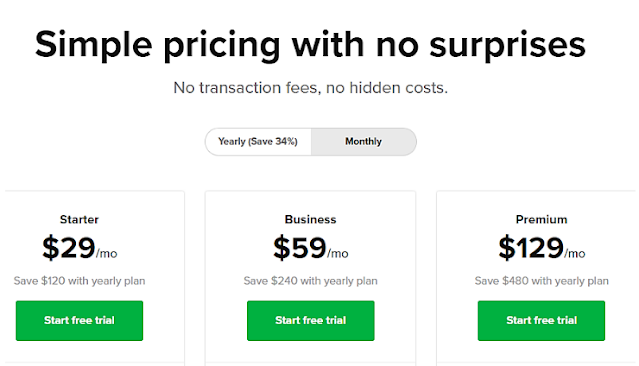
The pricing in Sellfy is simple with no hidden costs or any transactional fees. While there are no free packages, they do offer a 14 day free plan to explore and later upgrade.


The Starter plan starts at $29, Business at $59 and Premium at $129. To further reduce the subscription cost, you can buy membership at flat 34% discount for annual billing. Therefore, the Starter Plan then can be availed at $19/month, Business Plan drops at $39/month and the Premium Plan at $89/month.


Sellfy Support

Sellfy site has a noticeable FAQ section that is helpful in presale questions. Sellfy documentation is easy to understand with the required items listed. The support team can be contacted only through email support. So, there is no phone support but you can get notified with a paid plan. You can reach out to the support team and learn about the platform through the blog section, Twitter, and Facebook accounts.  


Pros

⇒ The entire interface is well-organized, neat, and remarkably simple to use

⇒ Sellfy enables your online store to embed with third-party platforms

⇒ Provides satisfactory email marketing tools

⇒ Can accommodate an unlimited number of products

⇒ The default system is mobile-responsive and SEO friendly

⇒ Comes with tracking and monitoring analytics for precise insights

⇒ Supports both Stripe and Paypal payment options

⇒ The platform is optimized for sales of digital items and membership subscriptions

⇒ There is no need to own your website to proceed with selling

⇒ Can set up a full-fledged online store without a domain name

⇒ Payment can be processed in more than 20 currencies

⇒ Payment gateway is secured by SSL encryption and PCI DSS compliance

⇒ Sellfy can be integrated with Facebook live chat, Facebook Pixel, Google Analytics, Twitter Ads Conversion Tracking and Zapier

⇒ Sales can be boosted using Sellfy’s upselling, cross-selling, and discount tools

⇒ Sellfy offers a 14-day free trial without your credit card information


Cons

⇒ There is no tool to set up and manage affiliate programs

⇒ Limited website customization capabilities

⇒ The number of app integrations is very limited

⇒ Supports only two payment gateways

⇒ Only two week trial period after which one of the premium plans has to be purchased


Read Also,

FindNiche Review – An Ultimate Dropshipping Niche Finder Tool

SamCart Review | The Right Shopping Cart Solution | Try a 14-day Free Trial! 

LiveChat Review | Incredible Chat Platform  | Get 14 days Free Trial

GetStencil: Incredible Online Graphic Tool Review


Final Thoughts

If you ever wish to set up an online store real quick then Sellfy is the best tool to try out. Though it falls short of some advanced features of other platforms like Shopify, SamCart, or maybe any other, it does not require a sharp learning curve or requires higher annual costs. The open-handed 14-day free trial is a great way to explore the features of Sellfy!


Originally Posted On: SaasTrac

ABOUT THE AUTHOR


SaasTrac is one of the trusted places where users can find reviews on different Saas Products, Softwares, and Platforms. Our major goal is to let users know the detailed and the most helpful information possible about every product—the good, the bad, and the ugly in the SaaS space.


ActiveChat Review | Versatile Chatbot Platform | Start your 14-Day Trial Today


​Table Of Contents

ActiveChat is the ultimate chatbot software for building a chatbot for your Facebook Messenger, SMS, Telegram, and website. The tool focuses on the conversational design and comprises numerous tools for seamless business integrations.


ActiveChat is a sophisticated visual chatbot development platform. There is great flexibility in bot design and the platform is easy to use for even those who do not have prior chatbot experience. The platform is equally powerful to achieve most complex business goals. 

Features

ActiveChat provides visual conversational designs and organized decision trees by just dragging and dropping. You can add dialogues, images to your chat scenarios. Some of the interesting features of ActiveChat are,

  • Visual builder
  • Website chat widget
  • Facebook Messenger
  • Telegram
  • Multiple channels
  • SMS autoresponder
  • Keyword detection
  • Website tracking
  • Roles and teams
  • Live chat
  • Advanced integrations
  • Timers
  • Broadcasts
  • Live chat groups
  • 10 agent seats included
  • Conversational AI
  • Advanced analytics
  • API access


The Elements

ActiveChat provides all the Chatbot attributes required to build your chatbot. What makes it terrific is the validation of user email addresses, dates, and emails. The only thing lacking is the location sharing and Vertical Lists.


User Interface 

The User Interface has an intuitive and simple dashboard showing the chatbots that you have created. ActiveChat makes use of the visual flow builder when you start to build a chatbot. With this, it becomes easy to create a chatbot flow and connect messages. You can select any of the elements and drag them in the flow builder and then connect this element with others using arrows. You also have an option to test your Chatbot in the same interface itself.


Users

Whenever there is any interaction with your chatbot then you can easily view the conversations and the related user information. It is also possible to assign tags and certain custom fields to users you can filter almost every element in your chatbot flow. You will also be able to segment users with custom fields and tags and send broadcasts to only specific segments of users of your choice. 


Messages

ActiveChat lets you send sequences and broadcasts to a particular user or a segment of users. You can use conditions also along with it. Here, again you can filter every element in your chatbot using custom fields and tags. You also have the option to create a chatbot in any language but it isn’t possible to easily translate your chatbot to another language.


NLP & AI

It is possible to identify keywords with ActiveChat. Furthermore, they have a Dialogue flow integration where you can grab the intent of the user and utilize the Entities.


Channels

With ActiveChat, you can put a chatbot on your website, Telegram, Facebook Messenger, and even send automated emails making an omnichannel chatbot experience for your users.

There will be no extra charge to send emails to your subscribers as it can be integrated with your own website/email server. You can also send SMS’s to your users with Twilio as it can be integrated with your chatbot. 


Integrations

​The most important integration of the chatbot is its built-in live chat. ActiceChat cannot be integrated with Zapier and Integromat. However, it can be integrated using a JSON webhook. Another amazing feature is the ActiveChat integrations with Google Sheets and Google Calendar. 


Marketing

You can attract more people to your chatbot by connecting Facebook Ads to your chatbot, building landing pages, creating QR codes and custom URLs to your chatbot. Unfortunately, you cannot use the one-time notification, auto-reply to Facebook comments, or create buttons to your chatbot. 


Website Widget

ActiveChat has a pretty advanced website widget. You will be able to send tailored messages to the user based on their current URL. However, instead of this, you will be able to check the number of page visits with which an extremely tailored message can be sent to the user. 


Analytics

Analytics are extremely important as they show your chatbot’s performance and help you to improve elements in your chatbot. But, Activechat provides minimal analysis of your chatbot and gives options to just see the number of users and user growth. 


ECommerce

With this, you will be able to integrate WooCommerce and Shopify with your chatbot. You can even make a purchase directly from the chatbot. You can also make a webshop within your chatbot using the Visual Flow Builder.

With the chatbot, you can add products to your cart, show products, cart, and create orders. Then, you can send the payment link within the chatbot so that users can pay directly through it. That makes an extremely impressive eCommerce integration.


Templates and Cloning

18 pre-designed templates can directly be installed to build your chatbot. It is also possible to duplicate your chatbot elements and chatbot flows to speed up your chatbot. But, there is no option to customize the templates and share them.


Optimization

There is no preference to optimize and perform A/B testing.


Support

ActiveChat consists of a database that has extensive documentation, video tutorials and provides customer support through email and live chat.


Pricing

ActiveChat provides a free trial for 14 days to test the complete features. 


The Team Plan will cost $33/month (if paid annually). This includes many features, 1500 chatbot users per year, and one live agent.

The Company Plan will cost $1249/month (if paid annually). This includes all features of the platform, 1,000,000 chatbot users per year, and 10 live chat agents.


Pros 

1.Very simple platform to use

2.Several bot templates

3.Several bots channel

4.SMS bot

5.Easy visual setup

6.Able to send the mass broadcast


Cons

1.Can be extended to some more channels like Instagram and Whatsapp

2.User Interface can be more attractive

3.No follow-up or segmentation

4.Slow customer support

5.No Zapier support

6.No RSS/feed integration


Read Also, SocialPilot Review | Ultimate Social Media Posting Tool | 14-Day Free Trial Vyper Review | 

Great Tool for Social Media Campaigns and Giveaways | Get Started for Free 


Conclusion

ActiveChat has a good interface and several chatbot elements, can add custom fields/tags, segment your users, send campaigns and broadcasts. It also comprises of Dialogflow integration, put your chatbot across multiple channels, has built-in live chat,consists advanced website widget and the best e-commerce integrations. 


The only lacking element is the Integromat/Zapier integration and the determination of chatbot analytics to further make improvements in your chatbot. Considering your requirements, advantages and disadvantages, you can decide on the chatbot software that suits your needs. ​


​Originally Posted On: SaasTrac

ABOUT THE AUTHOR


SaasTrac is one of the trusted places where users can find reviews on different Saas Products, Softwares, and Platforms. Our major goal is to let users know the detailed and the most helpful information possible about every product—the good, the bad, and the ugly in the SaaS space.

Sendinblue Review | Incredible Email Marketing Service | Start for Free

The importance of email marketing can only be understood by an e-commerce store owner as it is one of the best online marketing techniques. Sendinblue is a user-friendly and popular email marketing service that is web-based, specifically beneficial for small to medium-sized organizations and enterprises. 

Sendinblue offers remarkable tools and templates, utility kits specifically designed for email campaigns, marketing automation, design and strategies, SMS and transactional emails. 

How Sendinblue works?

Sendinblue is fundamentally an email marketing platform that allows users to build engaging and mobile-friendly beautiful emails with the help of tools and services that have been specifically designed to perform unique tasks and processes. The solution lets scheduling and automation marketing campaign process, allows pre-testing of the deliverables before sending the email campaigns to the target audience.

Sendinblue sends transactional emails with the SMTP protocol through the API. The contact management attributes let users import/export contacts, collect forms, categorize email lists, and many such efficient functionalities. Sendinblue platform also provides real-time analysis of campaigns, performance reports that include key statistics like click-through, open rates, etc. The platform empowers small companies and non-profit organizations to attain sustainability with their target marketers. 


Features

Sendinblue is a complete email marketing tool that benefits non-profit organizations and companies to build sustainable relationships with their target markets with the help of email campaigns, transactional and SMS messages. The software comprises a range of features including,


Social Media Marketing – The tool allows you to incorporate your marketing strategies and campaigns to many social media services and platforms.


Google Analytics Integration – Allows the tool to integrate Google Analytics with Sendinblue software solution giving more insights on the campaign.


Simple Import/Export – The individual contacts and email lists can be easily and quickly managed. 


Contact Manager – A complete functional contact management system lets users manage their contact list from a single location.


Autoresponder – This important feature lets users auto respond to some queries raised by clients or customers on their contact list.


Easy to use email editor – The easy-to-use email editor lets create professional engaging and responsive emails.


Opt-in, Opt-Out Forms – The sign-up forms are dynamic consisting of advanced features like captcha verification and data auto-population. There is also an option for your leads to choose specific mailing lists they would prefer opting.


Bounce Management – The tool provides logs of soft and hard email bounces in which hard ones get automatically blacklisted.


List Management – You can manage your mailing list depending on user demographics, behaviors, and lead scores. The multi-parameter filtering tool lets you segment systematically if you are handling several leads at once.


Personalization – messages can be personalized using many flexible ways before sending them to your leads.


Email Automation – This tool provides dynamic and powerful email automation functions. The workflow editor lets you target leads based on web behavior, on-site actions, and contact data. You can also test them before activation.


Multilingual – Sendinblue comes in six different languages.


Transactional Email – Users can set their system to send transactional emails that may contain purchase confirmations, receipts, etc. Through SMTP.


Email Templates – By default, the software provides 65 different types of pre-designed email templates for ready usage.


Integrations – The platform can be integrated with various third-party software including patent, CRM, marketing, and e-commerce. The tool can also be integrated with Zapier.


Landing Page Editor – This is useful while creating special landing pages. You can either choose to ground up or simply capitalize on the already available templates and make your work much easier.


Support – The support team is helpful via live chat, phone, and online messaging systems. There is also a helpful knowledge base available for important guidelines and useful tutorials that answer most of your doubts and queries.


Pricing

Sendinblue offers various affordable pricing plans that can suit an organization or an individual company. The pricing starts from a free plan and three paid plans accordingly.

The FREE plan comes with an unlimited contact list and the ability to send 300 emails per day.


The LITE plan is perfect for new marketers priced at $25/month with a monthly email volume of 10,000. Users can avail of features added in Free Plan and you also have no daily sending limit and excellent email support. The add ons with this plan offers A/B Testing, a removable Sendinblue logo, and view advanced statistics.


The PREMIUM plan gives the best solution for marketing professionals priced at $65/month with a monthly email volume of 20,000. Features from Lite+ are included in this plan including marketing automation, Facebook ads, landing pages, multi-user access, and all-around telephone support.


The ENTERPRISE plan is specifically made for marketers who wish to experience more out of Sendinblue. You can get a customized quote as per your requirement. Features include everything in Premium Plan and you get customized email volume, prioritized email sending,20+ types of landing pages. There can be 10+ users using the account, customer success manager, lots more elements to explore.

Pros

1.Sendinblue email automation functionalities are flexible and powerful.

2.Free plan can be used to generously send 300 emails per month.

3.There is an unlimited contact list available on every plan

4.The strong inbuilt CRM app is provided for tracking customer lifecycles.

5.The Premium Plan comprises extra landing page builders for the creation and review of landing pages.

6.Sendinblue plans are reasonably priced compared to other competitors.

7.Free plan also supports email automation and contact management functionalities.


Cons

1.The templates are outdated and needs to be built from scratch or use custom HTML design 

2.Supports a limited number of integrations.

3.Autoresponders and mergers have limited functionalities.

4.Web applications are sometimes slow when loading some pages.


A look at the latest softwares,

SendPulse Review – A complete email marketing software

MailerLite Review | Effective & Simple Newsletter Software

GetResponse Review: The Most Comprehensive Advanced Email Marketing Tool


Finally-Is it a good choice for email marketing?

After looking at the features of the tool, Sendinblue can be boasted of some very clever options to accommodate marketers to optimize their email campaigns, including personalization, segmentation, advanced email automation, professional landing pages, and flexible forms that in turn assists in increasing conversions.


The automation features may still be far from other tools like MailChimp and ActiveCampaign, but it does suit small-sized business and non-profit organizations. Their generous free plan and paid plan starting from $25 for 10,000 mails are one of the cheapest in the market. 


Looking at the overall features of Sendinblue, they are undoubtedly quite impressive. You could consider trying the free plan, and if you like it, you may end up using this sophisticated marketing automation in your budget.


Originally Posted On: SaasTrac

ABOUT THE AUTHOR


SaasTrac is one of the trusted places where users can find reviews on different Saas Products, Softwares, and Platforms. Our major goal is to let users know the detailed and the most helpful information possible about every product—the good, the bad, and the ugly in the SaaS space.


Webflow Review – An Exceptional Website Builder| Forever FREE


Webflow is a website builder that has attracted a lot of attention. But how nice is it? For whom designed? How much this software costs? I am going to address all the above-mentioned questions, But, let’s start with the basics first –


Introduction


Most of the people refer to Webflow as an online toolkit for building websites. It’s a great combination between the classic content management platform and conventional website builders like WordPress. It is indeed one of those exceptionally SaaS platforms with the professedly specific target market.

Getting Confused?

This review post created to wave off that confusion. Considering the various components which Webflow offer including, CMS, Designer, eCommerce, Hosting, etc. you will also get answers to questions for anyone considering this platform.


The primary principle of WebSocial is so-called “smart codelessness”. Alternatively stated, it aims to provide a desirable balance between customization capabilities and code fewer processes of site-building. Also, you can monitor many of your website’s attributes without operating on the correct source.


Surprisingly, this platform does not lock you out of the cycle of coding. It still uses fun software to help you thoroughly customize your page, without actually confining yourself to any particular submission platform.

Are you feeling interested to know more?

Alright, hang around because this review post of the Webflow enables you to reach all the major components associated with this platform. Read out the essential features of Webflow, customer support, pricing, and the associated pros and cons.

Overview

Webflow moved ahead to the path of success with this mantra – “If you can imagine the ultimate outcome, you can bring it to life.”


This simple, yet versatile web-based drag and drop tool mainly developed with the principal focus on the designers and regular people. This tool will help them easily create responsive, flexible and powerful websites and applications better and faster without any special coding skills.

But that’s not all. The site builder was also systematically integrated with a CMS framework for seamless management of the entire ecosystem.

The platform is consistently integrated based on the framework of the Content Management System, which helps in seamlessly managing the entire ecosystem. They are also looking forward to capitalizing on some of the core functions, which include:

  • Ecommerce
  • CMS
  • Designing
  • Web Hosting
  • Interactions
  • Editing, etc.

Though this platform serves as an alternative to WordPress, it claims to be much simpler than this. As having said that, WordPress considered being one of the simplest and the best and simplest CMS platforms available on the internet today.

So, will Webflow able to take the challenge? Let’s check it out!

Salient Features

Inclusive Ease Of Use

One thing that could impress you right off the bat is the overall versatility or flexibility of Webflow.

For example, the website designer doesn’t come with the rigid site construction framework that is available in many other “user-friendly” options. In other words, you can choose any template of your choice here.

Although that considered to be an easy option as there are limited customization capabilities for pre-designed themes. But this website builder allows you to start with a completely blank canvas and build your site from the ground up.


Not only this, Webflow is designed to facilitate complete responsiveness and mobile-centric adaptability. Moreover, it also provides various designing features which include the tiniest website elements. Typography, which has numerous possibilities to accommodate, including Typekit, Google Font, and your own custom font.

Webflow, in particular, does not restrict you to its system. At any time, you can conveniently export Javascript, HTML, and CSS from your page to a third party website.

In case you are working on different projects simultaneously, then you should be able to arrange and control them directly from the dashboard display. With the project options, you can add them in folders, share, duplicate, and edit them. All the projects are available with a different set of array settings, which includes external service connections, SEO, code integrations, backups, websites, etc.

Though the only downside is the complex framework that is available with it. Newbies can find it a little difficult to try out the latest features of Webflow. However, it becomes easier and easier with more websites you work on.

These people also offer a complete set of useful video tutorials, which helps in providing valuable guidance in case you face any issues. But if that doesn’t turn out, you can always contact the customer support team, who I found to be quite responsive.

On the whole, people who are having the most manageable time using this platform are probably HTML and CSS coders. Similarly, on the other hand, non-coders are also most likely to gain great results just by footing well after a couple of hours on this platform.

Also Read : Why Choose Wix as a Free Website Builder | An Honest Wix Review?

WebFlow Hosting

The hosting function provided by this platform works on the policy – “Start building for free, add hosting to go live.” In simple terms, you are allowed to start creating your website on a free Webflow subdomain. You can then pay for one of the Webflow hosting packages to connect the website to a custom domain name.

One of the best plans to gain complete advantage of the hosting services is the basic plan. It allows us to provide hosting for some simple site with less than 500 form submissions and 25,000 monthly visits and at a minimum cost of $15 per month or $12 per month billed yearly.

Not only the custom domains, but there are also some extra features which are provided by this tool –

  • Free SSL certificate
  • CDN
  • Advanced SEO
  • Backups
  • Versioning

Some of the other benefits of leveraging Webflow hosting include:

  • Webflow hosting based on decentralized infrastructure operated by renowned cloud providers such as Amazon CloudFront and fastly.
  • Webflow hosting provides an additional CDN (Content Delivery Network) at zero additional cost. It accelerates the delivery of content to site visitors far from the position of your primary server.
  • Provides SSL compliance certificate for free to ensure that each site adheres to the current standards for web encrypted communications.
  • Webflow hosting based on more than 100 data centers spread across 6 continents, letting you choose a server that is nearest to your chief traffic source.
  • It provides a shorter loading page as compared to the standard HTTP websites.


Webflow Designer

The website builder and the design tool is given a fancy name as Webflow Designer, which provides a unique twist to the entire website creation process.

It provides a balance between the worlds of coding and non-coding. Users who do not have the advanced coding skills will take advantage of the intuitive DIY side of the website builder. Instead, on the other hand, experienced programmers, designers, and organizations will benefit from the complete freedom of choice that comes with the programming side of the Webflow site builder.


Therefore, you can consider it as a hybrid site builder. Apart from this, some of the specific features of this platform include:

Languages like JavaScript, HTML, and CSS coding easily handled by website-builder. Web developers expected to like the code creation features of their visual designer, which saves the trouble by line writing code.

The next thing which sets this Designer apart from others is its exceptional approach to editing the visual things. As here the canvas is designed to provide you with an easy to use way to tweak the elements of your page, with the versatility provided by HTML and CSS. For example, placing a square requires you to add a new “part” or “box” and then build a “set” location.

Well, Webflow Designer seems designed to serve professional web designers along with developers in the first place as well as their agencies.


Final Words

Webflow is one exceptional, high-end website builder for freelancers and designers. Several features like Databases, integrations, databases, several layout edit modes, identificators, integrations, template code export, etc. make it one of a kind platform.


The blended force of its Hosting, Designer, E-commerce offers, and Editor/CMS is massive. This website builder has also the most exquisite tailor-made website development setups. The 24*7 support team makes every single process smooth and easy.


In short,

Simplicity Level – (simple)

Progress in Learning – Mid (before you think to jump in and create something, you need to first watch the available videos and understand every terminology)

For Consumers (Perfectly suitable)

For Designers (Perfectly suitable)

For Developers (Perfectly suitable)

Time taken in the Development process (Quick)

Whitelabel – For businesses and agencies who carry out the payment.

In-built templates – Yes

Pricing Plans – Low


Your Thoughts?

I am thankful to you for taking the time from your busy schedule to read our analysis of Webflow. Was this review helpful? Do you have something to add, or do you disagree with some points? Let’s discuss in the comment section given below.


Originally Posted On: SaasTrac

ABOUT THE AUTHOR


SaasTrac is one of the trusted places where users can find reviews on different Saas Products, Softwares, and Platforms. Our major goal is to let users know the detailed and the most helpful information possible about every product—the good, the bad, and the ugly in the SaaS space.


Oribi.io Review 2021 + 10 Days Free Trial: Is It A Good Replacement For Google Analytics?


Oribi analytics platform review! Well, we believe most of you here are digital marketers or somewhat related to the online promotion of products and services on websites and are well aware of this beautiful tool. But for those who are new to Oribi, let me put up a question right in front of you.


If you have a website already, you must have firmly linked to Google Analytics. It is one of the most reliable, widespread, and dominant analytics tools currently. Now, the question is, do you wholly depend on Google Analytics? 


But this might be a little tricky to answer for those who have not unfolded the power-packed features and an easy-to-use dashboard to track their website activities. Oribi offers more actionable insights and shares an excellent competition to Google Analytics in the run.


Well, to support the above claims regarding Oribi and to make you clear about switching to a better analytics platform despite having a good bond of years with Google Analytics, we present to you the most honest review of Oribi.io 2021. So, let us roll right in and explore every bit of the Oribi web analytics platform


All-Inclusive Oribi.io Review


For a digital marketer, tracking the website analytics is pretty significant. And due to this reason, this review post becomes way more relevant to you as we claim to have in hand a better analytics platform than Google Analytics. As there isn’t much information related to Oribi by far, we have intended to provide you with the best guide possible.


Oribi is fundamentally a business analytics intelligence software. They aim at enhancing the medium-scale businesses significantly by providing all the power-packed features, top graded optimization with leading-edge technology to its users.


Oribi profoundly concentrates on the following:

  • Design
  • Product
  • Marketing

It has a closely linked team with impressive ideas. It was brave enough of Oribi to launch something already available in the market. And also when it is running under the name of one of the top-notch companies from around the globe. Hence, it made sure to outstretch its extraordinary features to extend a fair competition to Google in the run.

Remarkable Features Of Oribi.io

Google is one of the most comprehensive platforms worldwide. Hence, for marketers to trust a comparatively small enterprise becomes more challenging. And this is the reason Oribi decided to come up with the most outstanding features, which makes it compete with Google Analytics with extensive data of integration.


Hence, you must dive right in and check out the features of Oribi.io in detail to present a firm conclusion.


Obtaining website analytics can be daunting. So, lets us identify how Oribi makes it easier:

1. Insights & Trends


Get Clear Answers, Without The Heavy Lifting

When all the data gets piled up, marketing insights and analytics come in for the rescue. Oribi lets you explicitly recognize the ways to convert these data into actions.

Oribi lets you connect with the latest marketing trends and provides you with detailed insight to help you create an impact on your audience.

Oribi.io Lets You:

  • Get actionable insights to drive results
  • Understand trends and be ahead of changes
  • No BS, only the information you need


2. Event Tracking

No Developers Required

Oribi has a pretty uncomplicated dashboard. And it does not require any prior technical knowledge to get started with it. You remain independent of professionals as it keeps track of all the buttons and pages your audience visits.

Oribi.io Lets You:

  • Track and compare multiple campaigns by their UTM
  • Define your conversion goals without any code
  • No maintenance – Events are updated dynamically


3. Funnels and Correlations & More


Optimize For More Conversions

If you are receiving good traffic on your website, you would unquestionably wish to keep going with the same. Hence, Oribi consistently optimizes your website and makes you recognize the trends that work for your brand and the ones that do not. So, by following the same, you can create content to drive more traffic every day.

 Oribi.io Lets You:

  • Uncover where you lose prospects, even across domains
  • Reveal which events drive conversions
  • Never miss anything with Oribi’s insights


4. Marketing Channel Analysis


Invest In The Right Channels

In this competitive world, no one wishes to invest in any incorrect channel. Hence, Oribi guides its users with every step by indicating the content which can make the most profit. 

Oribi helps its users identify and acquire the most engaging channels having a high conversion rate. 

Oribi.io Lets You:

  • Evaluate how each channel contributes to your goals
  • Stay on top of new referrers and spot opportunities
  • Track and compare multiple campaigns by their UTM


5. Visitor Journeys


Pinpoint specific Behaviour 

When several visitors land on your website, it becomes daunting to count on everyone and understand their pattern. But with Oribi, you can recognize and track the interests of your audience network. And above all, Oribi helps you identify the reasons which make the user bounce back from your website without conversion.

Oribi.io Lets You:

  • Follow single visitors across different sessions and multiple domains
  • Use Oribi’s smart filters to look into journeys of specific segments
  • Connect email addresses to match journeys to your top prospects


6. Reports


Share Your Best Results

Oribi provides you with a complete customized report which you can share with others. You do not need to work hard to track all the prospects to extend a report. Oribi records every move you make.

Oribi.io Lets You:

  • Get ready-made, beautiful reports to share your results
  • Customize the look, logos, and data you want to include
  • Schedule your reports to be shared automatically


7. Marketing Attribution


Connect All Touch Points

If you consider multiple social media platforms like Instagram or Twitter, all of them have various touchpoints, which create hassle while dealing with all of them at once. But with Oribi, you can connect with the different touchpoints at ease.

  • Uncover all touchpoints involved in a conversion
  • Choose different models to evaluate your activities
  • Define the right acquisition strategy for all your goals

Hence, these features make the Oribi platform stand one step ahead of Google Analytics. And on the bottom line, we can say that the users do not need to hassle with the marketing activities when they have Oribi.io to assist them.


Oribi.io Pricing Plans


Oribi has 03 different subscription/pricing plans. Let us have a look at them in detail.


Business Websites 

Pricing Plan: $630/Mo

It Includes:

  • Track Up to 3 Domains
  • Channel Analysis
  • Automated Event Capturing – Unlimited
  • Visitor Journey and Email Capturing
  • Webinar access
  • 6-Month Data History
  • Funnel Optimization
  • Custom Reports
  • 100% support
  • Analytics Bootcamp
  • 1:1 Onboarding

Ecommerce Shops 

Pricing Plan: $540/Mo

It Includes:

  • Track Up to 3 Domains
  • Channel Analysis
  • Budget Planning
  • Custom Reports
  • 6-Month Data History
  • Funnel Optimization
  • Automated Event Capturing – Unlimited
  • Visitor Journey and Email Capturing
  • 1:1 Onboarding


Marketing Agency 

Pricing Plan: $900/Mo

It Includes:

  • Unlimited Customers
  • Channel Analysis
  • Budget Planning
  • Custom Reports
  • Export Unlimited Events to Facebook, Google Ads & More
  • Advanced User Management
  • 2 Years Data History
  • Funnel Optimization
  • Automated Event Capturing
  • Visitor Journey and Email Capturing
  • Export Unlimited Smart Audiences
  • White Labeling & Custom Design for Your Reports
  • 1:1 Onboarding


You can also contact the Oribi team through info@oribi.io.


Does Oribi.io Offer A Free Trial?


Oribi.io is a platform to compete with Google Analytics with all its extraordinary website analytics features. So, to make sure the audiences reconsider the platform before concluding, Oribi provides a 10 days free trial to everyone out there.


So, apart from acquiring all the outstanding features, Oribi believes in letting the users closely interact with the tool to have no questions before upgrading the platform.


How To Set Up Oribi.io?


We have come across the features of Oribi.io, so let us have a look at the procedure to set up the platform. It is a user-friendly platform that can get configured by following the below-mentioned steps. 


Also, the tool will ask for submitting various information about the project on which you are working to make sure to provide you with the functionality which will suit you perfectly. 

The Sign-Up Procedure

To get started with the Oribi platform, follow these steps:


Step-1: Click on the official website link: https://oribi.io/ and get started with the free trial.

Step-2: Sign up with your pre-owned Google account or explicitly mention your email Id and password.

Step-3: Mention your website domain name. After upgrading your subscription, you can insert multiple domains altogether.

Step-4: Oribi will ask you to mention the number of users you expect to visit your website, which will show up in the pricing plan. 

Step-5: Lastly, insert your mobile phone number when indicated by the platform.


Now that you have completed the signing-up process, you need to configure the Oribi platform according to the niche of your business. Hence, the users will have to describe their business projects and its types on the platform. Also, the tool will ask you to mention the leading targets of your business.


Opportunities And Obstacles With Oribi.io


Oribi is an all-in-one web analytics platform that works wonders for businesses following any niche on the eCommerce platforms. Also, gaining the analytics is always helpful, even if you have merely 10 visitors showing up on your website or thousands of potential customers checking out the site.


Let us roll in and check the advantages and disadvantages of switching to Oribi.io in brief.


Assets

  •  User-friendly interface
  •  Oribi dashboard is easy to navigate
  •  Tracks all the required website insights and displays the metrics on the platform
  •  Benefits in quick decision making and ensures higher conversion rates

Liabilities

  • The setup procedure takes longer than usual
  •  Pricing plans can be more flexible


Read some more,

Mobile Phone Tracking Software: SpyFone Review 2021

ShortStack Review 2021 : Boost Engagement on Digital marketing Platforms


Should You Switch To Oribi.io In 2021?


Oribi is an all-in-one marketing analytics tool that cuts down your efforts on manual configuration. Hence, it helps the new business owners and the professional ones to receive website traffic insights and enhance their conversion rates without involving any professional.


The entire Oribi system is pretty uncomplicated to use with a powerful dashboard to navigate easily. Also, the features included are entirely automated, so you do not require any skills to get started with the tool. 


On the other hand, it might look a little expensive, but if you truly understand the need for a website analytics platform for your business that is better than Google Analytics, you might not mind the price.


So, with this, we come to an end of our take on Oribi business analytics intelligence software review. Is there something on which we missed out? Do you wish to add something more to our review? If yes, feel free to mention your suggestions in the comments below! 


Originally Posted On: SaasTrac

ABOUT THE AUTHOR


SaasTrac is one of the trusted places where users can find reviews on different Saas Products, Softwares, and Platforms. Our major goal is to let users know the detailed and the most helpful information possible about every product—the good, the bad, and the ugly in the SaaS space.